Check that both items fit the same character
Open equipment comparison and choose the two items you are considering. Select the character's race and level before reading the requirements result. The comparison retains the selected items when the race changes, so an incompatible choice remains visible with its requirement warning.
Check the weapon or equipment slot as well as the level. Two similar names can refer to different weapon families, and Chinese and European equipment is not interchangeable. A higher degree is not a substitute for matching the item to your intended character.
Several items can also share one name. The item picker lists each one with its race, degree, seal, level and purchase cost, so choose the line that matches the item you mean.
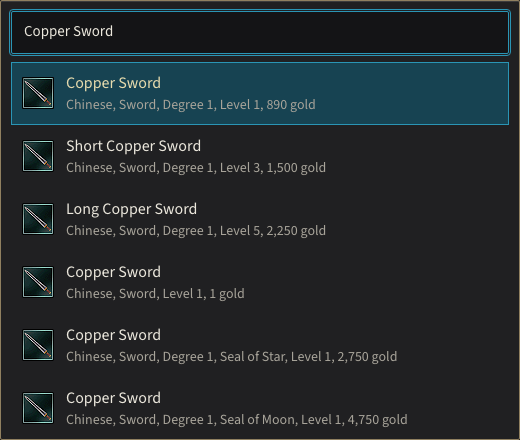
Searching for Copper Sword lists every item of that name. Its Seal of Star and Seal of Moon versions share level 1 and cost 2,750 and 4,750 gold.
Compare a first weapon upgrade
The Copper Sword and Infantry Bronze Sword example puts two Chinese swords side by side. Copper Sword requires level 1 and costs 890 gold to purchase. Infantry Bronze Sword requires level 8 and costs 3,500 gold. Their purchase-cost difference is 2,610 gold.
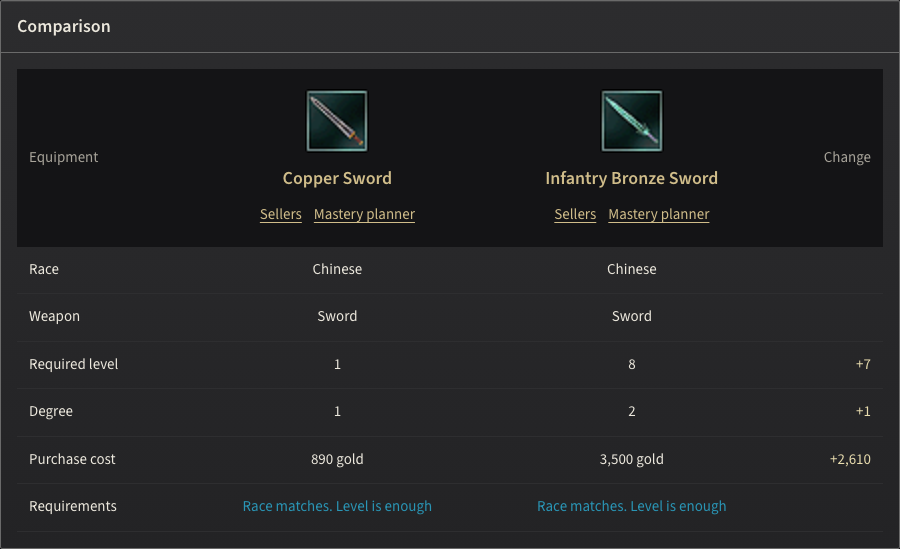
Infantry Bronze Sword needs seven more levels and one more degree than Copper Sword, and costs 2,610 gold more.
| Item | Level | Purchase cost |
|---|---|---|
 Copper Sword Copper Sword | 1 | 890 gold |
 Infantry Bronze Sword Infantry Bronze Sword | 8 | 3,500 gold |
Set the character level below 8 to see why the second item is not yet a usable purchase for that character. Changing the selector to European should flag the race mismatch without replacing either sword. This makes the comparison useful for planning ahead rather than only listing items usable right now.
Read each difference in its own unit
The comparison separates requirements, degree, seal and purchase cost. These fields should not be added into a single strength score. A gold difference is a budget decision; a level difference is a requirement; a seal identifies the item variant. None proves a specific damage increase by itself.
Use the requirement comparison to decide whether you can equip an item and what it costs. Check its attack and defense in the game before deciding whether it improves your build; the displayed price difference does not measure combat performance.
Find the exact item at a merchant
Follow Sellers beneath a selected item to the shopping plan. The shopping plan keeps the exact variant you selected, even when other items share its name. Choose from the listed merchants; a purchase price alone does not mean that every blacksmith stocks the item.
Blacksmith Chulsan stocks both swords in this example. Open the vendor's detail page to inspect the stock and map location. Return to the comparison when deciding whether to buy now or retain the cheaper item while progressing toward the requirement.
Keep equipment and mastery planning connected
Use the character's matching mastery planner link after choosing a weapon family. Confirm the skills' actual rank prerequisites and SP cost. Equipment eligibility and skill eligibility are separate checks, so satisfying one should not silently mark the other complete.
Copy the comparison link to keep both item variants and the character settings together. Another player can then compare the same items without having to distinguish them by name alone.