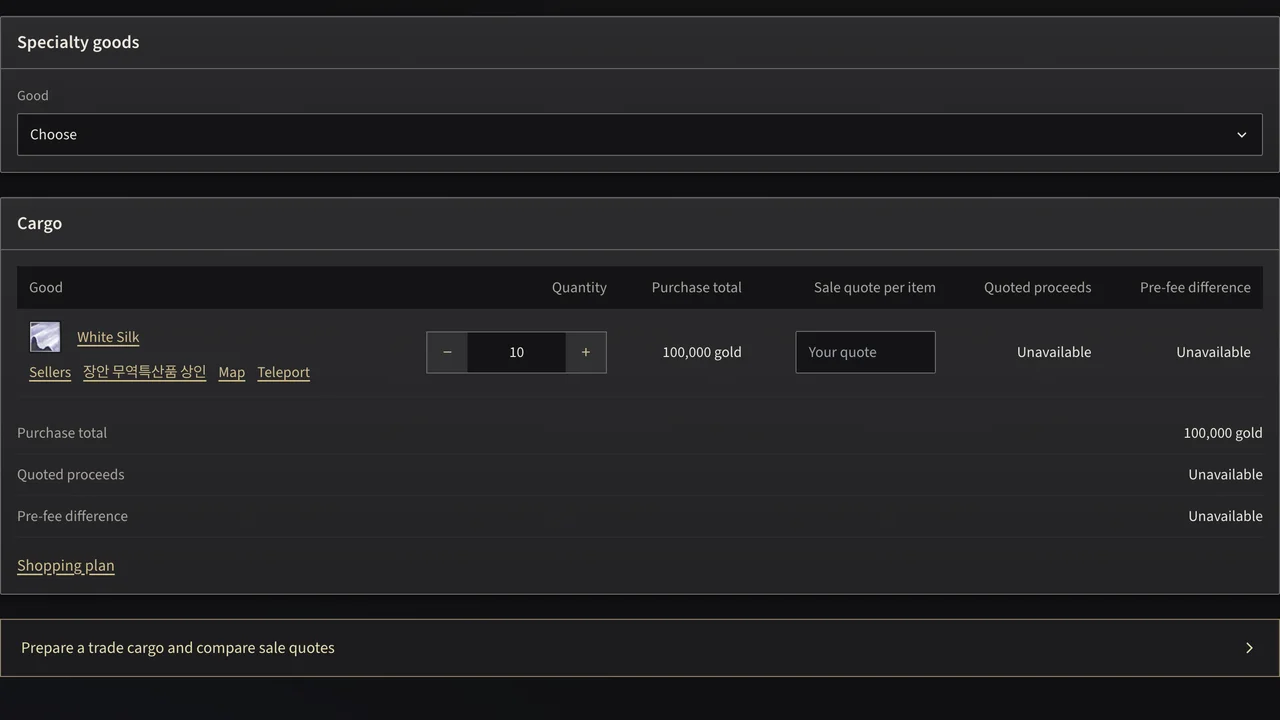
Choose the exact specialty goods
A cargo starts with the goods you intend to carry. Open Trade cargo, search for the good and check the matching item page. Job equipment and recipe manuals are not cargo simply because their names contain Hunter, Thief or Trade.
Some goods share a name. The White Silk stocked by a specialty merchant differs from this White Silk, which has no listed NPC seller. Match the item and merchant before using a sale quote, and check the purchase price at the shop.
Set your purchase quantity
Add each good once and enter the amount you intend to buy. A purchase total requires a known gold price from its seller. White Silk's purchase price is unavailable here, so check the offer in the game. Without that price, the pre-fee difference also stays unavailable.
The quantity control describes your plan, not a transport capacity limit. Check your transport and the conditions of your server in the game. The calculator does not invent a capacity from the item name or assume that every listed good fits into the same vehicle.
Use the shopping plan to group goods by a known seller. A purchase cost without a seller is not proof that an arbitrary trader stocks that variant.
Enter the sale quote you actually have
The Sale quote per item field is your input. Enter the unit price offered at the destination, not the total for the whole stack. Quoted proceeds multiply that price by the cargo quantity.
Leaving a quote empty means the proceeds are unknown. Entering zero means the goods would return no gold at that quote. Those are different situations and the calculator keeps them different.
The pre-fee difference subtracts the purchase total from the quoted proceeds. It is not a promise of final profit: transport expenses, fees, losses and changes to the offer can still affect the result. No distance multiplier or guessed risk score is added to the quote.
Plan the journey separately
After checking your goods and quotes, open the teleport itinerary. Select the departure and destination to see the connected gates. A route can work in one direction without an equivalent connection in the other, so use Swap direction when considering the return trip.
Use the world map and the seller page for the location details. Gate connections show a possible teleport route; check in the game whether your loaded transport can use each gate and whether the journey is safe for your current job.
Keep the shopping and cargo links for your preparation. A shared cargo carries the selected goods, quantities and quotes, so another player can review the same scenario rather than reconstructing it from a screenshot.